🎯 What is the “Contributors Only” option?
- This is a question visible only to contributors (e.g., manager, N+2, administrator).
- The employee cannot see it and cannot respond to it.
- It is useful for collecting confidential managerial observations (e.g., potential, behavior, specific needs).
⚠️ Limitations:
- Cannot be used with advanced questions (Objectives, Skills), response lists, or Star Questions.
- It is not possible to create a review using only this type of question: there must be at least one question visible to the employee.
👥 What is the “Contributors and Employees” option?
- This is a shared question, visible to both the employee and the contributors.
- Both parties can answer it or add comments.
- It encourages discussion and comparison of perspectives.
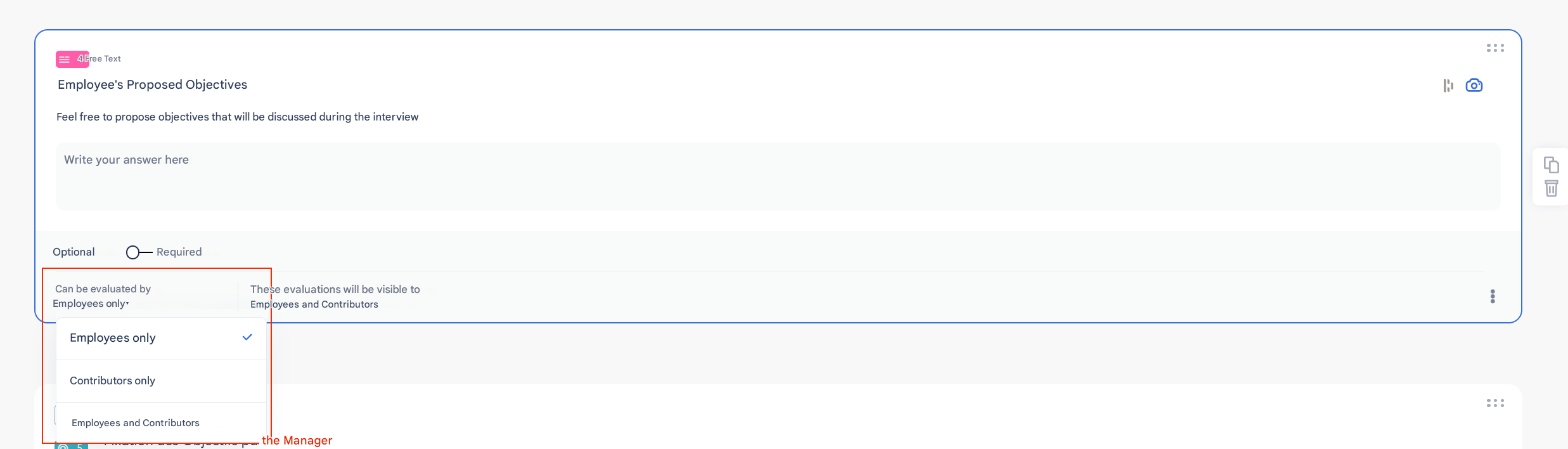
🛠️ How to configure the respondent type for a question?
- When creating a question, go to the configuration area.
- Choose the visibility mode:
- Employees only
- Contributors only
- Employees and contributors
- Save: the question will be displayed only for the selected profiles.
📌 Best practices
- Use Contributors only questions for sensitive elements or evaluations reserved for the manager.
- Use Employees and contributors questions to encourage transparency and discussion.
- Combine both to balance constructive feedback with confidential follow-up points.