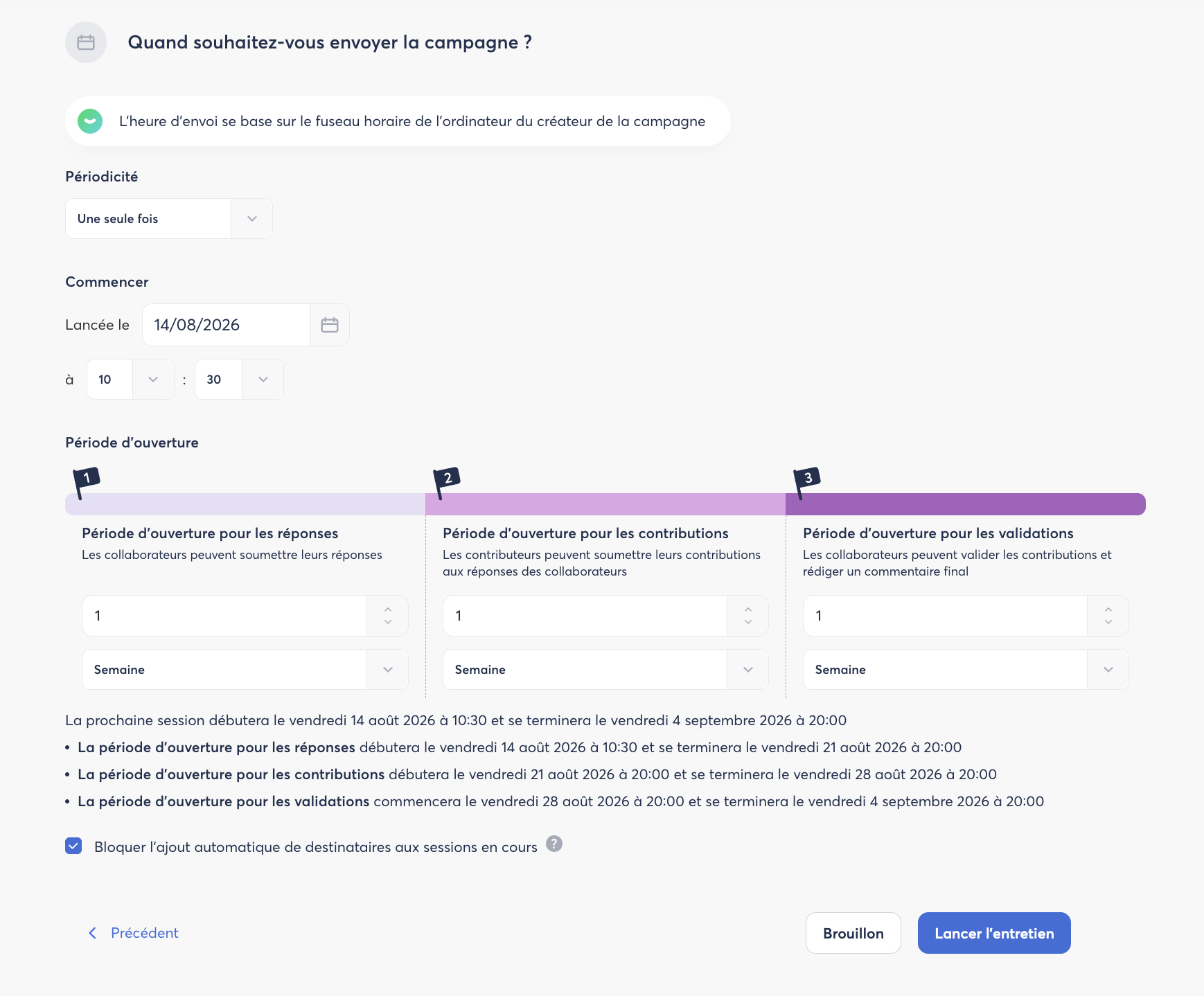
The Schedule step defines the timeline and duration of your interview.
Choosing the frequency
Two main options are available:
- One-time: the interview is launched once on a specific date. Ideal for annual performance reviews or one-off interviews.
- Recurring: the interview repeats automatically at a chosen frequency: Weekly, Monthly, Quarterly, Half-yearly, or Yearly. Each repetition constitutes an iteration.
Setting up the first iteration
- Enter the launch date and time for the first session.
- The time zone used is that of the campaign creator's computer.
- An annual preview is automatically displayed so you can verify the schedule of upcoming iterations before confirming.
Configuring the open periods
Each iteration (session) consists of three successive periods:
- Response period: employees can submit their answers.
- Contribution period: managers (contributors) can review the responses and submit their assessment.
- Validation period: employees validate the interview and can add a final comment.
Each period is defined in days, weeks, or months. The minimum duration is 1 day.
If a period is in progress, it can be extended. If a period has ended, it can be reopened, provided the next iteration has not yet started. The reopening deadline is calculated based on the start date of the next session.