After? Moving to action
- Analyze your results (in Zest, with the help of the Lab team if needed)
- Identify your strengths and priorities for action.
- Discuss global and localized results with your employees – start thinking about causes and solutions…
- Co-build an action plan with your employees – the issues were raised by them!
From feedback to progress: let’s take action!
Phase 1:
Results analysis
- Identify strengths to highlight to the team.
- Identify areas for improvement (lowest-rated questions, gaps compared to company average, evolution compared to the last survey).
- Focus on action priorities, justified by survey results.
- Use open comments to enrich the
Phase 2:
Discussion with the team
- Organize a collective discussion moment (team meeting, dedicated time).
- Present results in a clear and transparent way.
- Involve the team in analysis and solution finding.
Phase 3:
Co-building the action plan
- Select 1 to 2 priorities among identified topics.
- For each priority, define one (or more) simple, realistic, and measurable actions.
- Identify an owner and a deadline.
- Define a success indicator.
Phase 4:
Progress tracking
- Integrate follow-up into existing rituals (team meeting, monthly check-in…).
- Communicate regularly on progress and concrete results.
- Stay agile: if an action doesn’t work, adjust it.
- Close the plan once actions are completed: quick review & recognition of efforts
Create an action plan in Zest
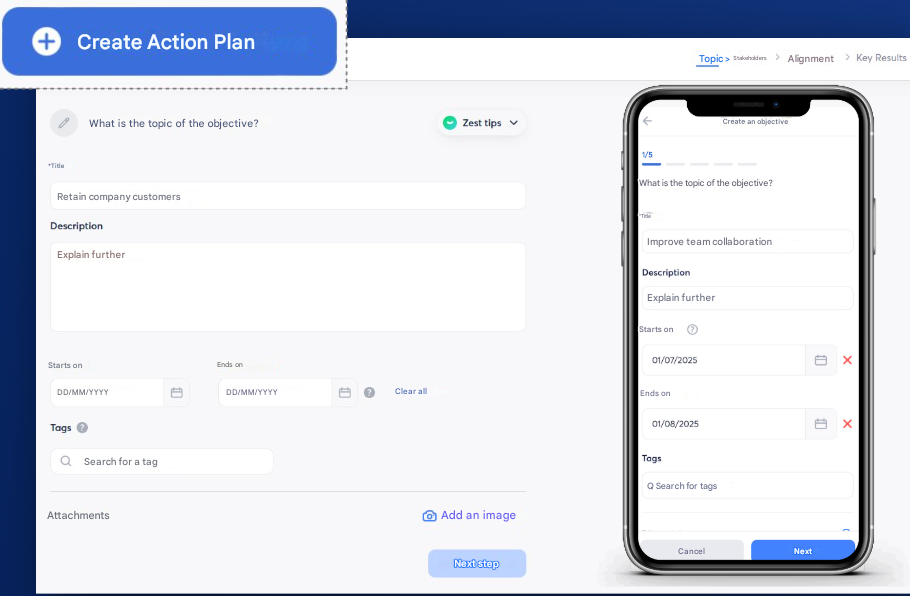
Step 1/4: Topic
- Access action plan creation from the results analysis page.
- This action plan is an objective you set for one or more employees.
- Define the objective with a title and a description, as well as start and end dates.
- Add tags (ask your Zest SuperAdmin to create new ones), which will help you organize and search your objectives in Zest.
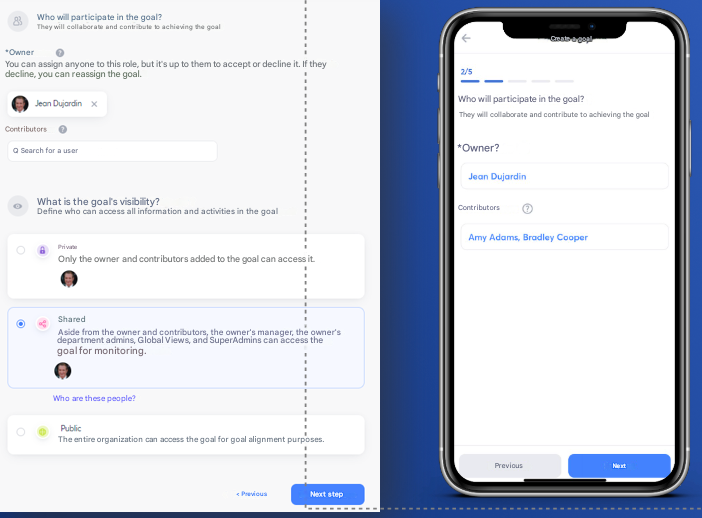
Step 2/4: Stakeholders and visibility
- Define an owner for this action: this person can modify the objective/action plan, update progress, and request feedback.
- Define contributors: these people can modify tasks and their progress. Note that contributors must accept the invitation to access it.
- Change the visibility status:
- Private: only the owner and contributors can access it.
- Shared: other people besides the owner and contributors can access it.
- Public: the whole company can access it for alignment purposes.
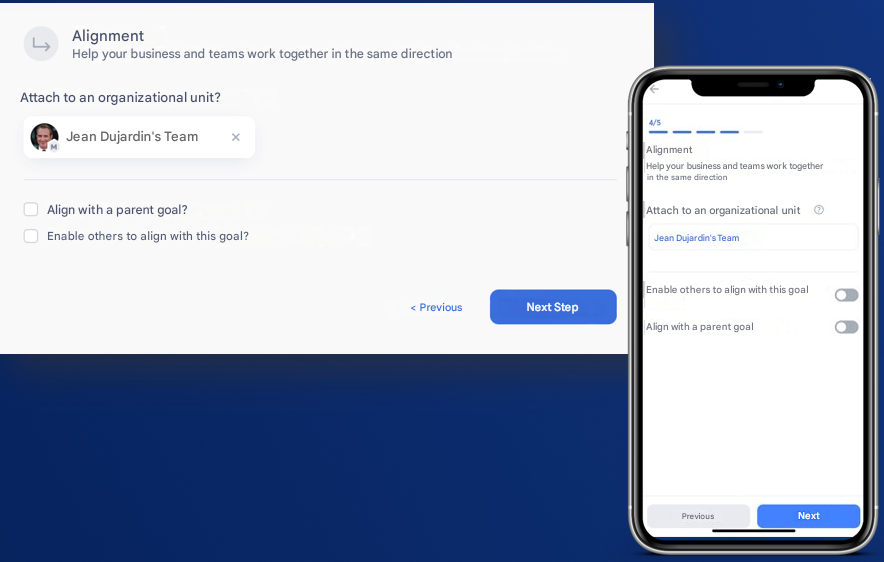
Step 3/4 Alignment*
- Link this objective to your team.
- Align with a parent objective: the objective you are creating becomes a child objective.
- Allow other objectives to align with this one.
This step is optional and only if enabled by your SuperAdmin
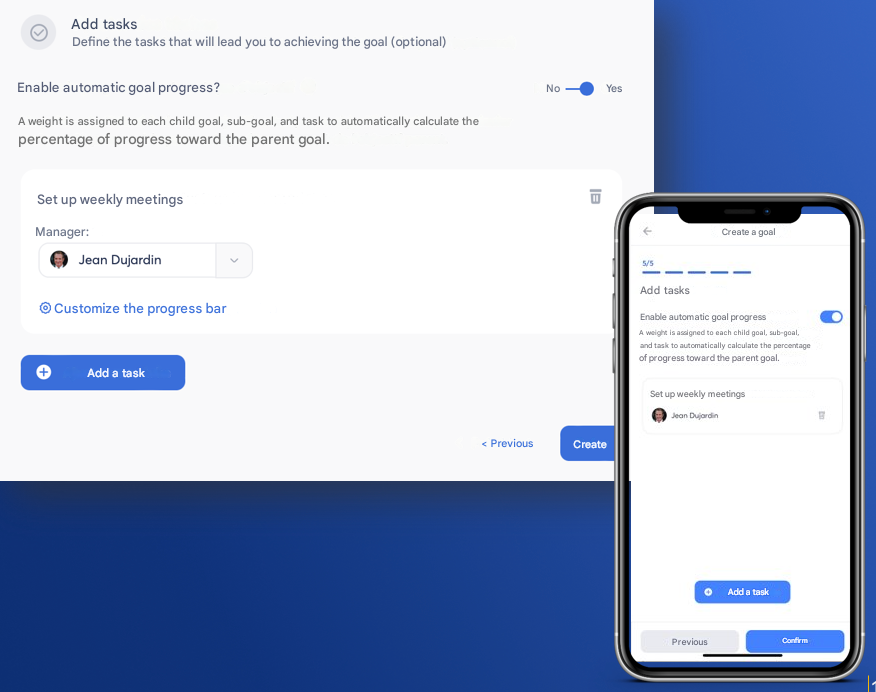
Step 4/4 Tasks
- Add tasks to the objective, corresponding to the actions of the action plan.
- Assign responsibility to employees (owner or contributors) who lead the execution collaboratively.
- Customize the progress scale if needed.
Manage your action plan in Zest
Access my action plan from the Objectives feature:
- My objectives: find objectives where you are owner or contributor.
- My organization: find objectives linked to your scope (team/department/location)
- All: find all objectives you have visibility on.
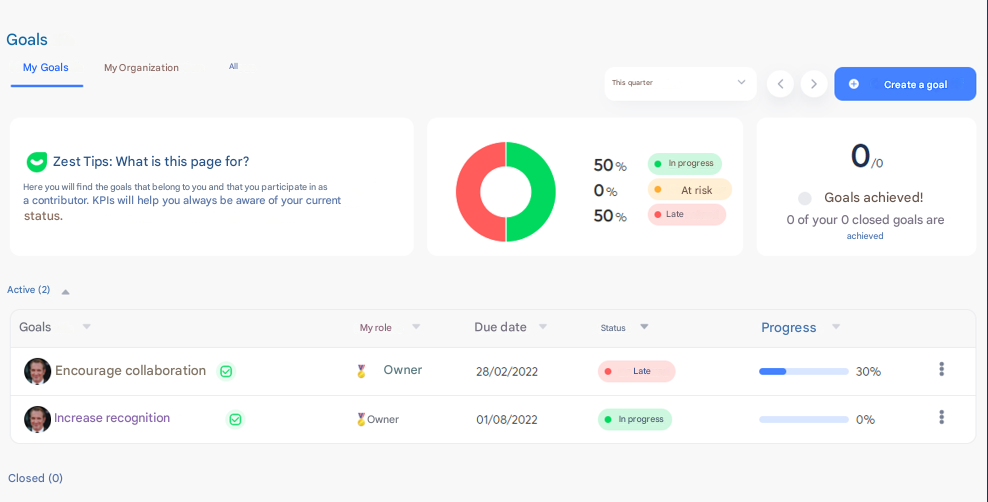
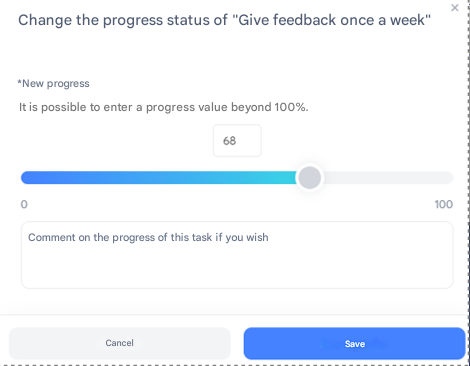
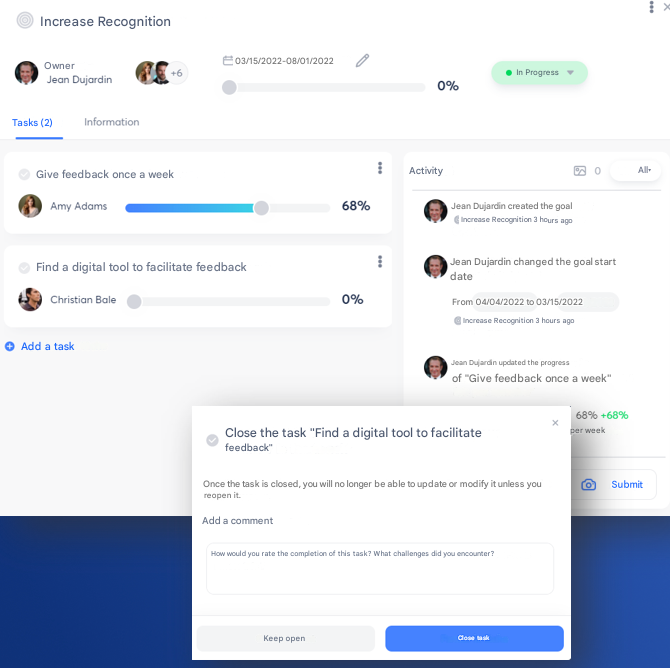
- Edit objective information (title, description, dates, etc.) if needed.
- Track progress and activity of the objective and its associated tasks.
- Update progress of the objective and tasks by dragging the cursor, and add comments to provide more context.
- Close tasks once completed.
Recommendations by scope:
- 2 to 3 action plans (“Objectives”) max.
- 2 to 3 actions (“Tasks”) max. per action plan (“Objective”)
Roles per action plan to create:
- Objective
- Owner: Director
- Contributor: QVCT representative
- Objective task(s)
- Responsible: Manager or employee within the scope, to be assigned per task
Visibility per action plan to create:
- “Shared”? (vs private / public)
- Department admin (Directors + QVCT representatives)
- SuperAdmin (Virginie and Karima)
- Global view