1️⃣ Redesign of the question results analysis page
What is it exactly and what’s the goal? 🤔
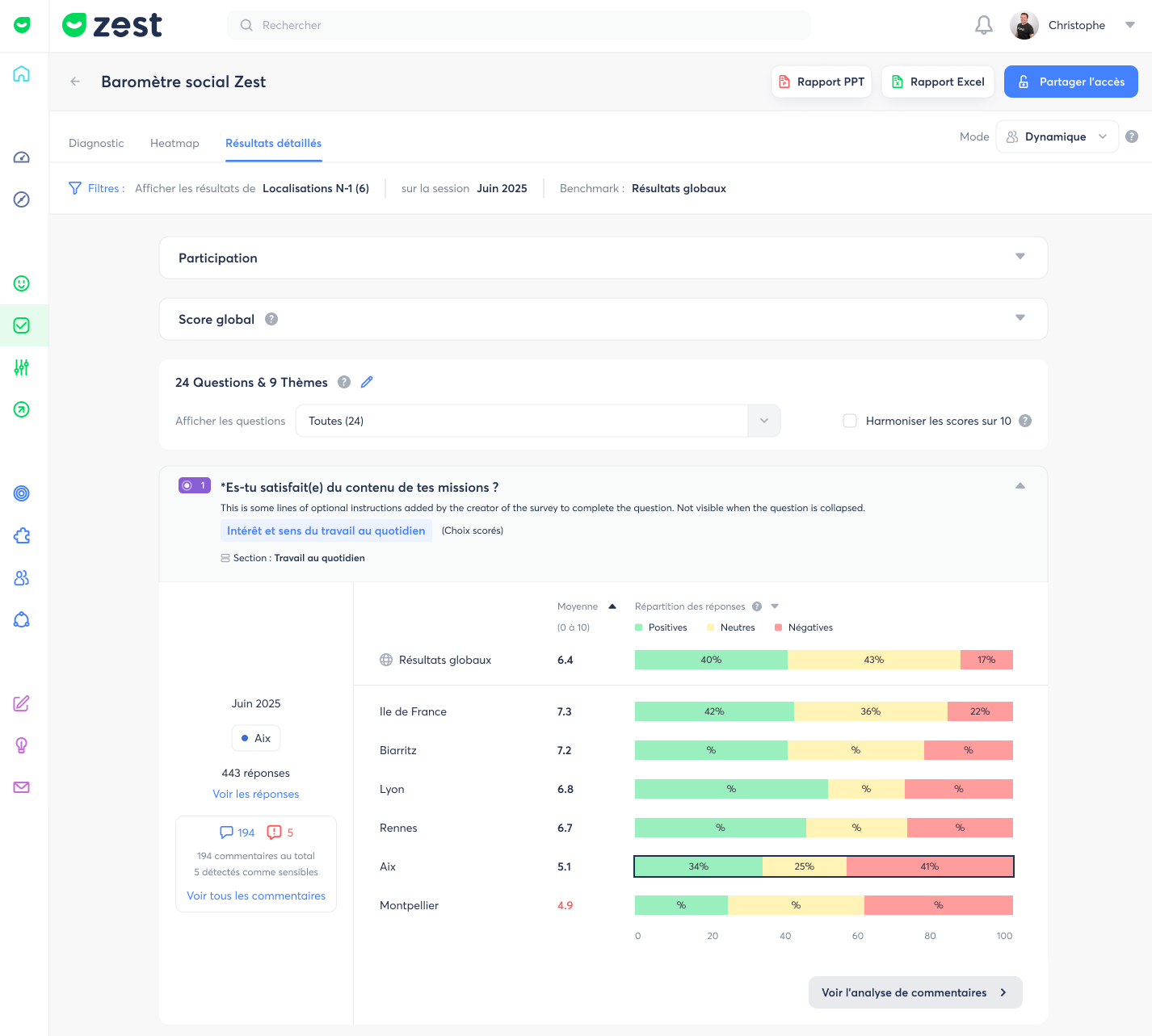
The question-level results analysis page has been redesigned to provide a clearer, faster, and more consistent view of results, regardless of the user profile (manager or HR).
These improvements aim to enhance the understanding and visualization of the results summary for a given scope, while ensuring a consistent analysis experience across all pages.
How does it work? 🧐
- The analysis is available from the Detailed results tab of the survey
- A new Participation section is displayed, along with a global score standardized on a 10-point scale
- Visualizations have been updated and adapt to each question type
- New filters and comparison options are available to refine the analysis
- Custom filters can be saved as favorites for quick access
👉 Important:
- These improvements are available on the Detailed results page
- They apply to all question types
- Calculation principles remain unchanged; only the analysis experience has been improved
ℹ️ Other updates
- Added a GDPR link on the survey introduction page (“How does Zest handle my personal data?”)
- Enhancement enabling automatic detection and merging of identical questions reappearing across different iterations of the same survey, in order to ensure response tracking over time despite intermediate changes.