Zest protects the confidentiality and identity of respondents to ensure that everyone can express themselves freely and securely.
The anonymity threshold is a key setting that defines the minimum number of responses required before results become visible — while preventing the identification of any individual respondent.
🔍 What is the anonymity threshold?
The anonymity threshold represents the minimum number of responses required for a set of results to be displayed without compromising confidentiality.
💡 In practice:
- If the threshold is set to 3, no results will be displayed until at least 3 people have responded.
- This ensures that respondents remain protected, especially in small teams or groups.
🧩 How identity protection works
1️⃣ Anonymity is clearly communicated to users before they submit their responses.
2️⃣ The identity of an anonymous respondent is never revealed — not to managers, HR, or even to Zest.
3️⃣ The anonymity threshold helps anonymize or block access to certain results if the number of responses is too low.
4️⃣ All dashboards and exports automatically apply this threshold.
5️⃣ The process fully complies with the GDPR:
- Legal basis: legitimate interest
- GDPR disclaimer validated at first login
- Data hosted in France (OVH, French-based company)
- Dedicated Data Protection Officer
🔐 All data exchanges are encrypted, and no mobile activity data is ever used.
📊 How the anonymity threshold works
🧠 Case 1: Anonymous mode
If the number of anonymous responses is below the threshold ➜
👉 No campaign results will be displayed.
🧠 Case 2: Optional anonymity mode
If the number of anonymous responses is below the threshold ➜
👉 All results are fully anonymized (including non-anonymous responses).
👉 If the threshold is met or exceeded, public responses remain visible.
📘 Example:
In a team of 10 people, if only 2 anonymous responses are submitted and the threshold is set to 3,
➜ all responses (anonymous and public) will be displayed in a
fully anonymized
However, at the company-wide level (e.g. 100 respondents), the threshold is likely reached, so public responses remain visible.
⚙️ How to modify the anonymity threshold
1️⃣ Log in to Zest from a computer using a Super Admin account.
2️⃣ Click on your name in the top-right corner.
3️⃣ Select Back Office.
4️⃣ Go to the Global Settings section.
5️⃣ Open the Listen tab.
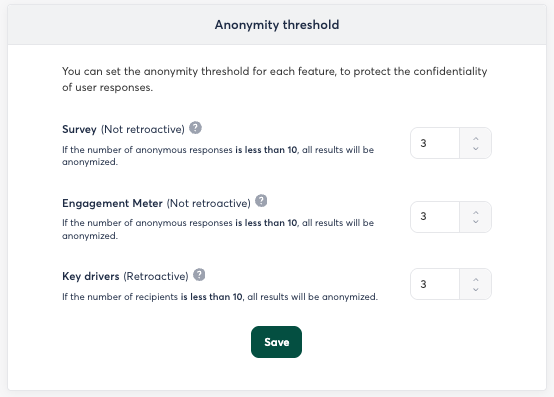
6️⃣ In the right-hand panel, adjust the Anonymity Threshold field as needed.
🧱 Good to know
🕓 The anonymity threshold is set when launching a campaign (Survey, Engagement Meter, or Levers).
➡️ It cannot be modified once the campaign has started or ended (except for Levers).
📤 Exports (Excel / PPT) always respect the anonymity threshold.
If the threshold is not met:
- The results cannot be exported for that specific group.
- Zest will automatically group data sets to preserve confidentiality.
💬 In summary
The anonymity threshold protects the freedom of expression and ensures the confidentiality of all responses.
It acts as an automatic safeguard, applied consistently across all result pages and exports.
Configurable in the Global Settings, it helps maintain a balance between transparency and data protection.