🔔 Schedule your reminders once and for all
What exactly is it, and what's the goal? 🤔
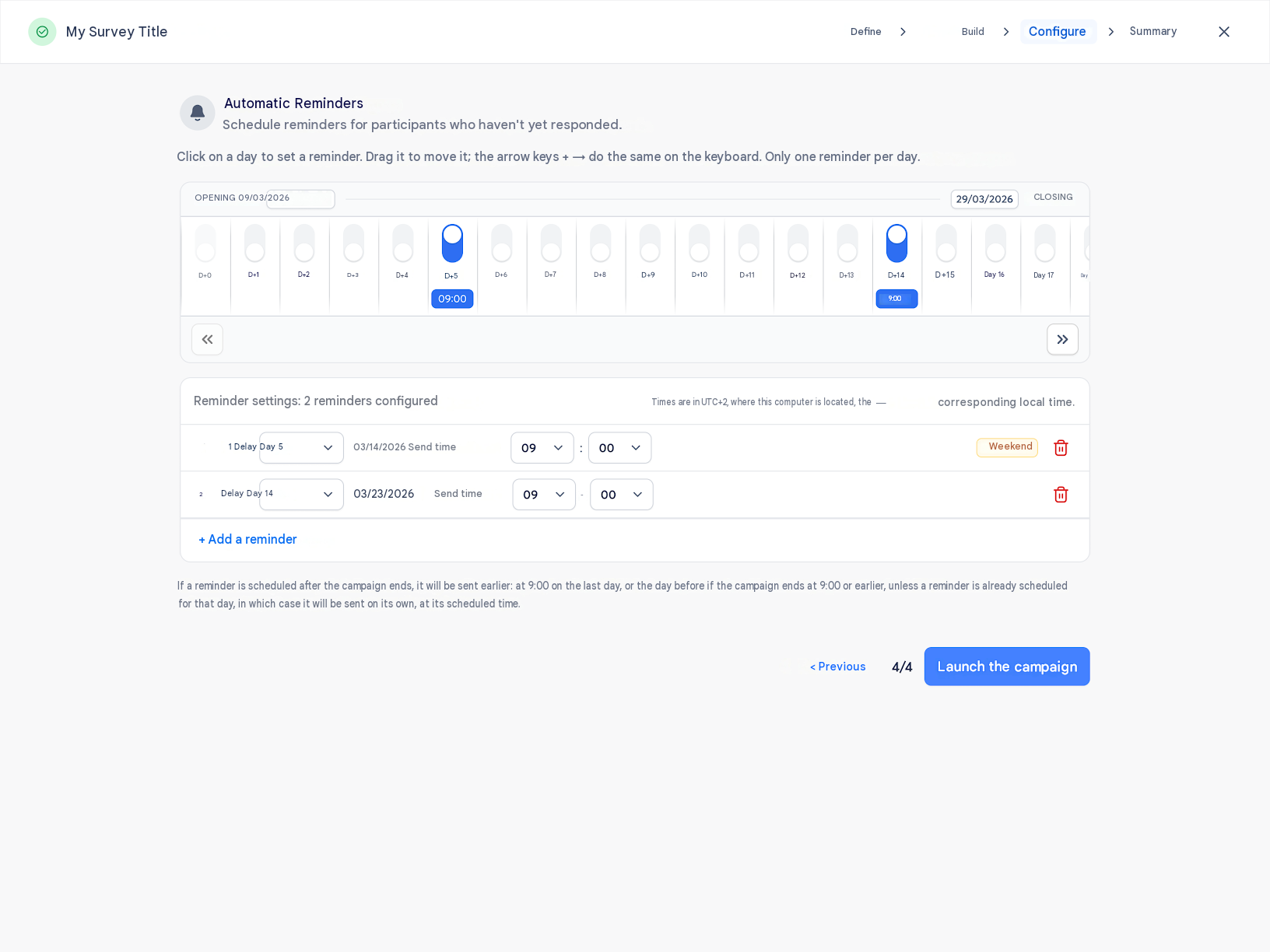
No more forgotten follow-ups! Zest now lets you schedule reminders in advance for participants who haven't responded yet — across your Surveys, Engagement surveys, Reviews and 360° Feedback campaigns. You set your reminders while building your campaign, and they go out on their own, on the days and at the times you chose. The goal: lift your participation rates without having to think about it, and finally see what each reminder actually brought in.
How does it work? 🧐
A new “Automatic reminders” step appears at the end of campaign creation. On a timeline, you click the days you want to send a reminder; in the table just below, you set the sending time for each one. Zest flags reminders falling on a weekend, a public holiday, or too close to another — it's your call. On multi-phase campaigns, each phase gets its own reminders, targeting its own audience.
Once the campaign is live, you track your reminders right from the results page: how many have been sent, when the next one goes out, and, on your Surveys and Engagement surveys, how many responses each one brought in on the participation chart. Need to adjust? The campaign's ⋮ menu takes you back to the configuration screen at any time. And the “Remind” button is still there whenever you want to speed things up — Zest simply warns you if an automatic reminder is already scheduled within the next 48 hours.